Beat the 14 day deadline: XBRL filing in Singapore for directors 2026


Most Singapore-incorporated companies that lodge financial statements with ACRA must file them in XBRL format, unless a specific exemption applies. If you’re unsure where your company stands, the first task is straightforward: confirm your company category, then pull together your signed AGM financial statements ready for tagging.
TL;DR:
Exempt private companies with no more than 20 members and no corporate shareholder are not required to file financial statements or XBRL at all.
Companies limited by guarantee, foreign branches, and MAS-regulated entities have specific filing requirements, often involving PDFs and sector-specific templates.
Validation failures mostly stem from incorrect taxonomy mapping, currency mismatches, and misclassified line items, which can be prevented by careful cross-checking before upload.
Updating your software tools to the latest version before starting the filing process is essential to avoid compatibility errors with taxonomy version 4.1.
Outsourcing XBRL preparation is advisable for complex, multi-entity, or taxonomy-changed filings, as professional services can manage tagging, validation, and timely uploads efficiently.
Table of Contents
Who must file XBRL in Singapore and who is exempt?
Your filing obligation hinges on company type. Solvent exempt private companies (EPCs), those with no more than 20 members and no corporate shareholder, are not required to file financial statements with ACRA at all, and so have no XBRL obligation whatsoever, according to ACRA’s own guidance. Insolvent EPCs, however, lose that exemption and must file.
Beyond that, the template depends on your entity:
Solvent EPCs: exempt from filing financial statements and XBRL entirely
Insolvent EPCs and most private companies: file Full XBRL or Simplified XBRL depending on size and complexity
Companies limited by guarantee (CLGs) and foreign company branches: file a PDF of financial statements plus the FSH (Financial Statements Highlights) template
MAS-regulated entities (banks, insurers): typically file using the FSH template with sector-specific disclosures
To verify your classification, check your constitution for member count and corporate shareholding, confirm solvency status at the last AGM, and check whether MAS regulation applies to your licence. Get this wrong and you risk lodging the wrong template, which BizFinx will usually flag at validation stage.
What is the ACRA taxonomy and why does version 4.1 matter?
The ACRA taxonomy is the structured dictionary of data elements that every XBRL filing must map against. Get the mapping wrong against the current taxonomy, and validation fails before you ever reach upload.
Template scope varies considerably by filing type:
Full XBRL: roughly 210 data elements, covering detailed notes to the accounts
Simplified XBRL: contains approximately one hundred twenty data elements, suited to smaller, less complex entities
FSH template: contains approximately eighty data elements, for CLGs, branches and MAS-regulated filers
Taxonomy updates matter because prior-year figures mapped under an older version don’t always carry across cleanly. Industry advisers flag imperfect prior-year mapping as one of the most common sources of validation failure after a taxonomy revision, so don’t assume last year’s file will simply roll forward.
How do you prepare and file XBRL through BizFinx and BizFile+?
Preparation follows a fixed sequence, and skipping steps tends to cost you time later, not save it.
Update your tools first. Uninstall any older BizFinx Prep Tool or Multi-Upload Tool and install the current release, since older versions can throw compatibility errors against the current taxonomy.
Start from your signed AGM financial statements. This PDF is your source document. Build a tagging map, a spreadsheet linking each line item to its taxonomy element, before you open the prep tool.
Populate and validate offline in the BizFinx Prep Tool, then save the file as XBRL (a .zip package).
Upload via the BizFinx portal. CorpPass-authenticated users can validate and upload; public (non-CorpPass) users can only validate, not submit. The Multi-Upload Tool handles multiple entities or subsidiaries in one session.
Attach the uploaded XBRL to your Annual Return in BizFile+ within 14 days of upload, since the file doesn’t sit on the server indefinitely.
Pro Tip: Assign someone in your finance team to own the tagging map as a living document. When next year’s taxonomy updates land, you’ll be reconciling against a clear audit trail instead of reverse-engineering last year’s PDF from scratch.
What causes most XBRL validation errors, and how do you fix them?
Validation failures cluster around a handful of repeat offenders, and most are avoidable with a proper cross-check before you touch the upload button.
Overuse of “others” or generic tags instead of the best-fit taxonomy element, which ACRA’s own guidance flags as a recurring reviewer concern
Currency and rounding mismatches, where figures in the XBRL file don’t tie back to the signed AGM statements to the last dollar
Misclassified line items, particularly current versus non-current balances
Prior-year entries defaulted to zero when the AGM statements actually show a comparative figure, or vice versa
Before upload, cross-check every tagged figure against the signed AGM PDF line by line, not just at subtotal level. Note that up to five files, each under 1 megabyte, can be validated at once in the BizFinx portal, which is a tight limit if you’re managing several subsidiaries in one filing round.
Directors, not the preparer, carry legal responsibility for the accuracy of what’s filed, even where a third party did the tagging. If a genuine mapping gap persists after these checks, an exemption from a specific business rule may be the right route rather than forcing an ill-fitting tag.
How do you apply for an exemption from a business rule?
Some validation rules genuinely don’t fit certain company structures, most commonly around consolidation entries or taxonomy elements that don’t exist for a particular industry. In those cases, an exemption from the specific business rule, not a full filing exemption, is the correct mechanism.
Common valid grounds: consolidation adjustments that don’t map cleanly to standard elements, or a genuine gap in the taxonomy for your sector
Where to apply: submit the exemption request through the BizFinx portal, referencing the specific validation rule number that’s blocking your filing
What to include: a clear explanation of why the figure can’t be tagged as the rule requires, supported by your signed AGM statements
Once granted: re-run validation with the exemption applied, then proceed to upload as normal
Exemption applications take time to process, so raise them as soon as a rule blocks you, not the week before your Annual Return deadline.
When must you file XBRL with your Annual Return?
Timing is where most late-filing penalties originate, not the tagging itself. Listed companies must hold their AGM and file the Annual Return within five months of financial year end; private companies get seven months, with some exceptions for companies that have dispensed with AGMs entirely.
The tighter constraint sits inside BizFinx itself: uploaded XBRL files remain on the BizFinx server for only 14 days. Miss that window and you’re re-uploading from scratch.
Build a working timeline that finishes tagging at least three weeks before your AR deadline
Upload to BizFinx only once you’re ready to lodge the Annual Return in BizFile+, since the clock starts the moment the file lands on the server
Leave a buffer week for exemption applications or re-validation if errors surface late
Treat the 14-day window as a scheduling constraint, not a cushion.
What has changed in XBRL filing requirements for 2026?
The most consequential update this year is tool-level rather than rule-level. ACRA’s 25 February 2026 release of the new BizFinx Prep Tool and Multi-Upload Tool requires anyone still running an older installation to uninstall it and install the current version before attempting a filing. Skipping this step is now a common cause of compatibility errors that have nothing to do with your actual tagging.
Taxonomy version 4.1 continues to underpin the current templates, and companies that mapped prior-year figures under an earlier taxonomy version should expect some elements to behave differently on re-import. This is precisely where the “imperfect prior-year mapping” problem tends to surface: a figure that validated cleanly last year can trip a rule this year simply because the underlying taxonomy element was refined or reclassified.
For most SMEs, the practical takeaway is procedural discipline rather than a change in who must file. The population of exempt EPCs, insolvent EPC obligations, and CLG/branch requirements for PDF-plus-FSH filing remain unchanged. What has shifted is the tooling underneath the process, and directors who assume “the same software will work” are the ones most likely to lose a filing day to an avoidable error.
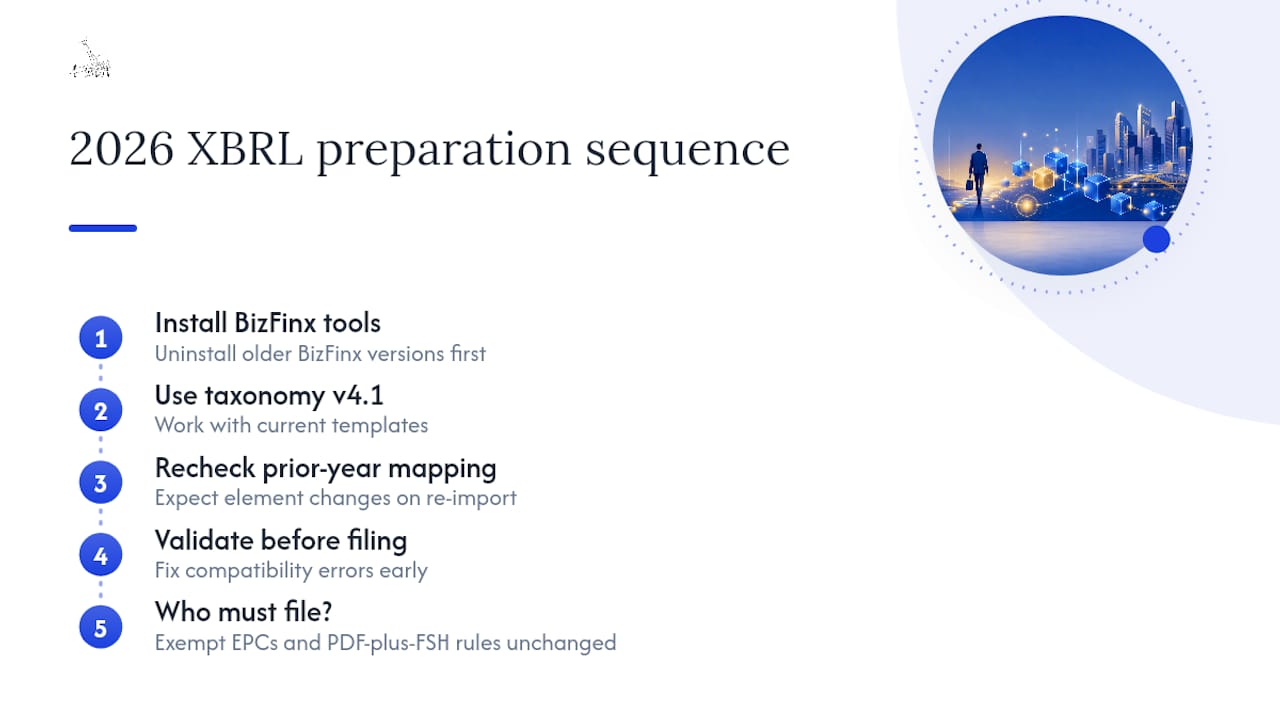
Where this affects you most is at the start of the season: check your BizFinx tool version before you open last year’s tagging map, not after validation fails.
When does it make sense to bring in outside help?
Straightforward single-entity filings with clean, unchanged accounts are often manageable in-house with the BizFinx prep tool and a careful eye on the tagging map. Where it stops being worth the internal hours is consolidated group filings, entities with multiple subsidiaries feeding one Annual Return, or years where a taxonomy update has broken prior-year mapping in ways that need real diagnosis rather than guesswork.
A competent engagement should hand you a completed tagging map, a full reconciliation against your signed AGM statements, and a validated, upload-ready XBRL file, with the director retaining final sign-off and legal responsibility throughout…
— Colin
How Headington supports your XBRL filing this season
Headington is the alternative to juggling BizFinx alone every filing season. Where in-house teams lose days to taxonomy changes, tool updates, or unfamiliar validation rules, A corporate secretarial team can handle the tagging map, reconciliation, and BizFinx upload as a single managed workstream, so your finance staff aren’t relearning the portal every year.
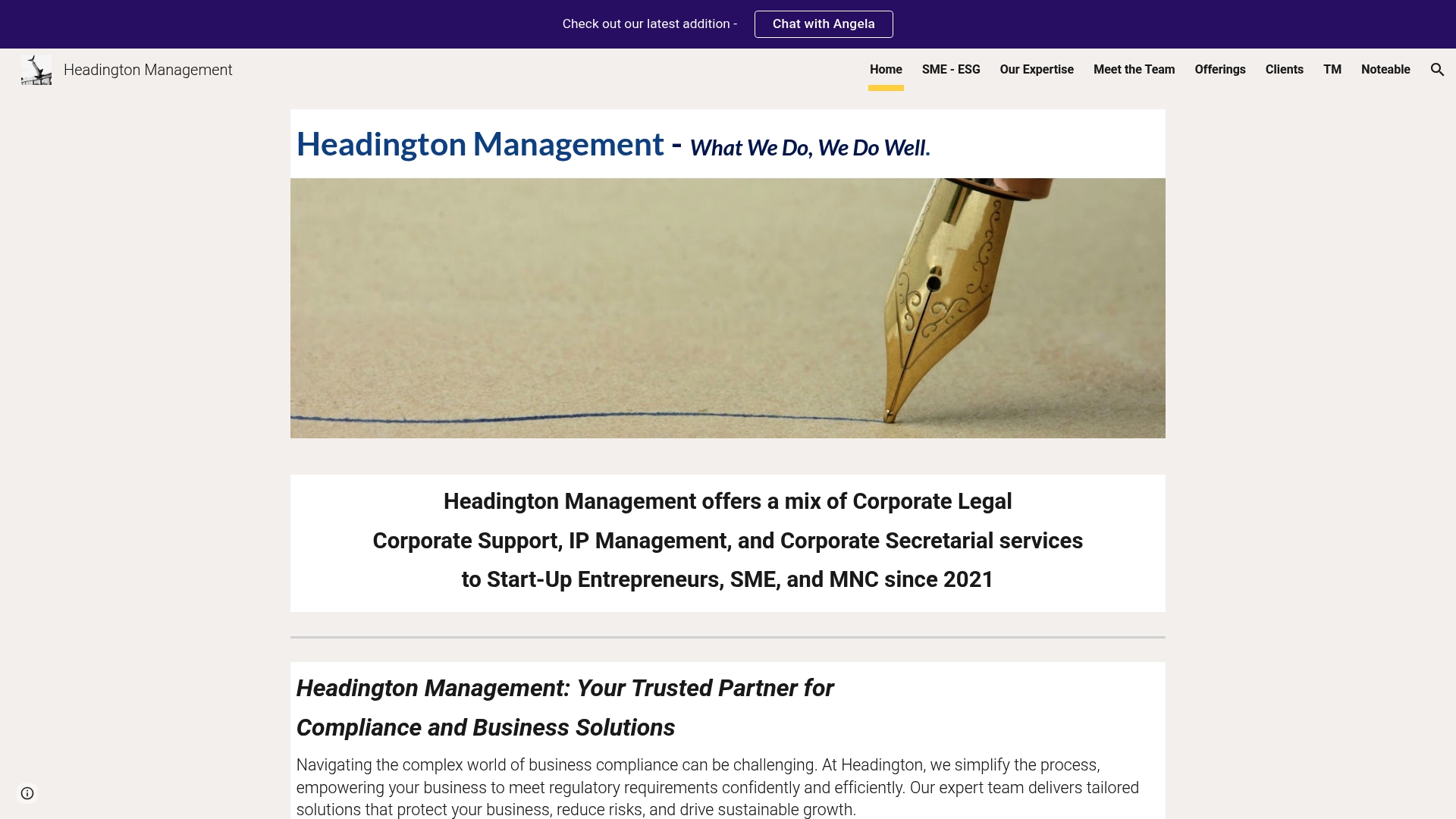
A typical engagement starts with your signed AGM financial statements and your company’s incorporation details. From there, the service provider builds the tagging map against the current taxonomy, validates the file, and manages the CorpPass upload and Annual Return attachment within the 14-day window. For groups filing consolidated accounts, this also extends naturally into wider corporate secretarial and compliance support, including entity structuring where a group’s reporting complexity calls for it. For trust or custodial arrangements tied to more complex ownership structures, specialist guidance on trust bank account setup can also be worth a conversation.
If your filing season is approaching and you’d rather hand off the tagging and validation work than chase a BizFinx error the week before your deadline, get in touch with Headington to scope your XBRL filing requirement.
This article is general information, not a substitute for advice from a qualified financial advisor. Consult a qualified financial professional about your own circumstances before acting on anything here.
Sources
FAQ
Is XBRL filing mandatory in Singapore?
For most Singapore-incorporated companies filing financial statements with ACRA, yes. Solvent exempt private companies with no more than 20 members and no corporate shareholder are exempt from filing financial statements entirely, and therefore have no XBRL obligation.
How do you prepare XBRL in Singapore?
Use ACRA’s free BizFinx Prep Tool, approved accounting software with XBRL export, or engage a corporate service provider, starting from your signed AGM financial statements and a tagging map against the current ACRA taxonomy. Preparation and validation support can be offered as part of compliance services.
How much does it cost to file an XBRL form?
ACRA does not charge a fee to prepare or upload XBRL through BizFinx itself; costs arise only if you engage a corporate service provider or purchase approved accounting software with XBRL functionality, and fees vary by provider and filing complexity.
How do you submit XBRL to ACRA?
Validate your completed file in the BizFinx portal using CorpPass credentials, then upload it, since public users without CorpPass can only validate, not submit. Once uploaded, attach the XBRL file to your Annual Return in BizFile+ within 14 days, before the file expires from the server.
Comments